Floor Is Lava Cloud Sync & Progress
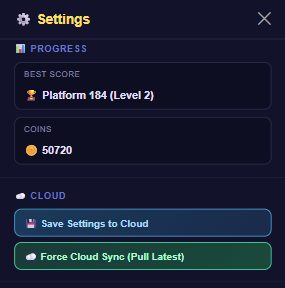
Two small sections sit just above Sound in Settings: 📊 Progress shows your best score and coins at a glance, and ☁️ Cloud lets you manually back up or pull down your save if you ever need to force it.
What's in these sections
- Progress — read-only. Shows your Best Score (platform reached and level) or "No runs yet" if you haven't played, plus your current Coins total and Piggy Bank balance (the Piggy Bank line disappears once you've removed ads, since there's nothing left to bank on death).
- Save Settings to Cloud — pushes your current save (coins, best score, settings, outfits, and progress) up to your account immediately, instead of waiting for the game's normal autosave.
- Force Cloud Sync (Pull Latest) — pulls down whatever is saved on the server right now and applies it locally. Useful if you played on another device and want this one to catch up immediately.
Both sections are visible even as a guest — the Cloud buttons don't actually require a linked account to appear, they just sync whatever's saved on this device. Creating an email or Google account is still what lets that data follow you to a different device, rather than staying local to this one.
How to use it
- Tap the ⚙️ gear icon in the top nav bar to open Settings.
- Check the 📊 Progress section for your current best score and coins.
- In the ☁️ Cloud section, tap Save Settings to Cloud right after making changes you want to guarantee are backed up, or tap Force Cloud Sync if you suspect this device is behind (e.g. you just played on your phone and switched to the web version).
Tips
- You don't need to touch these buttons for normal play — the game already syncs automatically. They're there for the rare case where you want to force it, e.g. right before switching devices.
- If your coins or best score look wrong after switching devices, try Force Cloud Sync before assuming anything was lost.
- Guests don't see this section at all — it only appears once you're signed in with an email or Google account.