Floor Is Lava: Guest Mode vs. Creating an Account
You can play Floor Is Lava fully as a guest — no sign-up required. A free account adds three things on top: a backup of your progress, the ability to play on more than one device, and a spot on the community leaderboards. Switching from guest to an account never resets your progress.
What it does
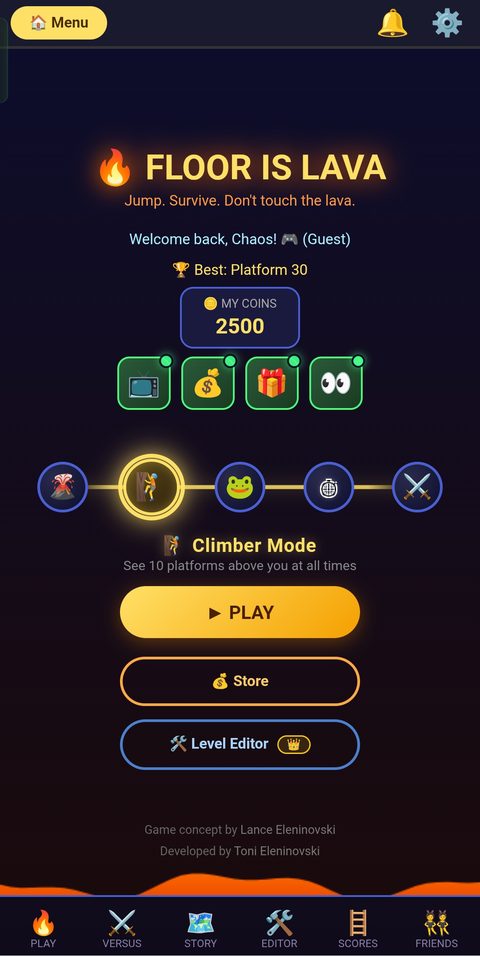
When you open Floor Is Lava for the first time, you're dropped straight onto the home screen — there's no login screen in the way. Behind the scenes the game signs you in as an anonymous guest automatically, which is why you'll see "(Guest)" next to your name on the home screen.
As a guest, your progress (coins, best score, story progress) is saved to your device only. The in-game Account panel puts it plainly: "Your progress is saved on this device. Create a free account to back it up, play across devices, and post to community leaderboards." Guest accounts can't submit scores to the community leaderboards — that's reserved for signed-in accounts.
There's also an older, separate guest system that uses a nickname plus a 4-digit PIN, reached through a "Play as Guest" screen — useful if you want to return to a specific guest profile on a shared device.
How to switch from guest to an account
- Open Settings (the gear icon, top right of the home screen).
- In the Account panel, you'll see the options Create Account / Sign In and Continue with Google.
- Pick email or Google — see Signing in with Email or Signing in with Google for the exact steps.
- That's it. Because the switch links your existing guest save to the new account, your coins, best score, and story progress carry over automatically — you don't need to re-enter anything.
Tips
- Only ever play on one phone and don't care about leaderboards? Guest mode is perfectly fine long-term.
- Want your progress safe if you lose or replace your phone? Create an account sooner rather than later.
- Switching to an account is one-way in terms of convenience — once merged, there's no separate "guest save" to fall back to, so double-check you're happy with which progress you kept if you see the comparison screen.