How to Switch Accounts or Log Out in Floor Is Lava
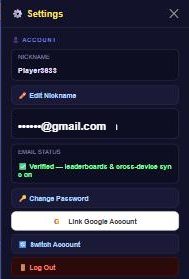
Go to Settings > Account — signed-in players (email or Google) see Switch Account and Log Out buttons there. Guests don't see either option, since logging out with no account attached would strand their progress.
What it does
Both options are only shown once you're signed into an email or Google account — not for guests. They do slightly different things:
- Log Out saves your progress first (syncing your profile and current game state), then signs you out and takes you back to the sign-in screen. This is the one to use in normal circumstances.
- Switch Account signs you out the same way but without an explicit save-first step, and is meant for quickly jumping to a different saved account on the same device rather than ending your session for good.
Signing out only clears the local pointer to which account is currently active — it doesn't delete any of your data. Your progress stays safe on the account itself (and in any other local guest saves on the device), ready for you to sign back in.
How to do it
- From the home screen, tap the gear icon (Settings).
- Open the Account panel.
- Tap Log Out to save and sign out, or Switch Account to jump to a different saved account.
- You'll land back on the sign-in screen, where you can log into a different account, continue as a new guest, or pick a previously saved account from the list.
Tips
- Guests don't have a Log Out button at all — if you're playing as a guest and want to "start fresh," see Guest Mode vs. Creating an Account instead.
- Floor Is Lava can remember more than one saved account on the same device, so switching between them doesn't require re-entering your password every time.
- Logging out doesn't delete anything — it's safe to do any time you want to hand your device to someone else or sign into a different account.