How to Change Your Nickname in Floor Is Lava
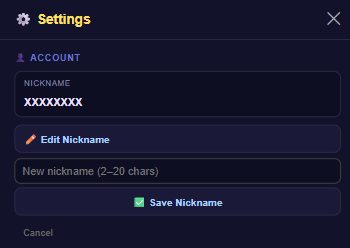
Go to Settings > Account > Edit Nickname, type a new name (2-20 characters), and confirm. If someone else already has that nickname, you'll be asked to pick a different one.
What it does
Your nickname is the name shown on the community leaderboards, so this is how other players see you. Both guests and signed-in accounts can change it from the same Account panel. If you have existing leaderboard scores, renaming carries them (and any likes they've received) over to your new name — you don't lose your ranking history. Guests don't post to leaderboards, so for a guest a rename is purely a local, cosmetic change.
How to change it
- From the home screen, tap the gear icon (Settings).
- In the Account panel, tap Edit Nickname.
- Type your new nickname. It needs to be 2-20 characters long, and can't contain the characters
. # $ [ ] /. - Confirm the change. If the nickname is already taken by another account, you'll be asked to choose a different one.
Tips
- Keep it between 2 and 20 characters — the field won't accept anything shorter or longer.
- Avoid the characters
. # $ [ ] /— the game will reject a nickname that uses them. - If your first choice is rejected as "already taken," it means another player's account already has that exact name — try a variation.
- Changing your nickname doesn't wipe your leaderboard position; your existing scores move with you.