Floor Is Lava Friends
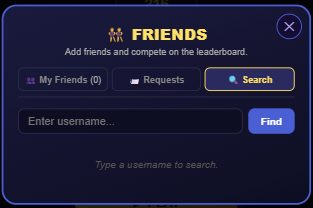
Tap the 👯 Friends button on the bottom menu to search for players by username, send friend requests, and build a friends list. Once you're friends, you can see each other on a dedicated Friends leaderboard and race their ghost run in Climber mode.
What it does
The Friends panel has three tabs: My Friends (your current friends list, sorted with Premium friends first), Requests (incoming requests to accept or decline, and outgoing requests you're waiting on), and Search (find a player by typing their username).
Friends aren't just a list — they unlock a Friends tab on the leaderboard. It works like the other per-mode leaderboard tabs, but only shows you and your friends, and you can switch it between Climber, Frogger, Timer, Cavern, and Versus to compare each mode separately. Each friend's row shows their best score, a 👑 badge if they're Premium, and a live online/offline status dot.
Friends also unlock ghost racing: from your Friends list you can tap Race on any friend who has a recorded Climber run, and you'll race against their saved "ghost" — you win the moment you climb past their best platform. It's a friendly race with no leaderboard score submitted and no coin-loss penalty if you fall.
You'll also get a notification when a friend accepts your request, when a friend of yours cracks the Community top 10, or when a friend records a new ghost run you can race against.
How to add a friend
- Tap the 👯 Friends button on the bottom navigation bar.
- Open the Search tab and type at least 2 characters of the username you're looking for, then tap Find (or just wait — it searches as you type).
- Tap + Add next to the player you want. This sends them a friend request — you'll see "Pending" until they respond.
- The other player opens their own Friends panel, goes to Requests, and taps Accept or Decline. Accepting adds you to each other's friends list immediately, both ways.
- You can cancel a request you sent (from the Requests tab, while it's still pending) or remove an existing friend at any time from the My Friends tab.
Tips
- You need to be logged in (a guest profile counts) to use Friends at all — it's the same account check as the rest of the social features, so signed-out players get an "Log in to use friends" prompt.
- Friends are tied to your account's save data, so if you're playing as a guest on one device, your friends list won't follow you if you ever start fresh on another device without linking an account first — see Guest vs. account.
- You can't send yourself a friend request, and you can't double-send one to someone who already has a pending request from you — the button just shows "Pending" instead.
- The Friends leaderboard tab is separate from the Community tab's "Show friends' levels only" filter for custom Level Editor levels — that's a different friends-aware feature inside Community levels.