Floor Is Lava Revive
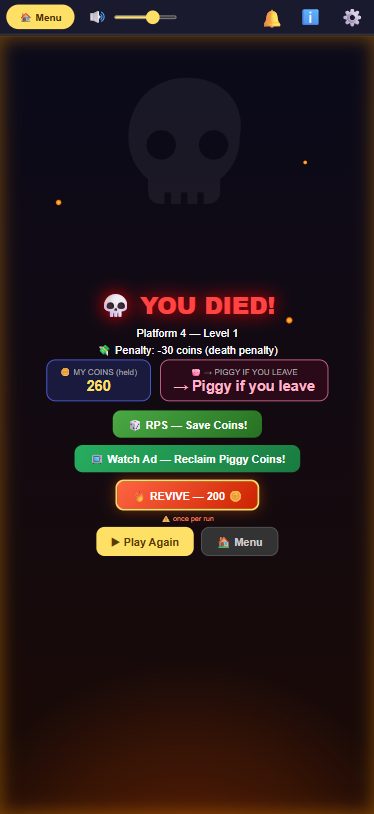
When you die, a REVIVE button appears on the game-over screen that spends coins to drop you back onto a safe platform: 200 coins normally, or 100 coins if you have Premium. You only get one revive per run — the button disappears the moment you use it.
What it does
Reviving is a coin-based mechanic, not a "watch an ad" mechanic — despite the button still being labeled "Watch Ad — REVIVE" on screen, tapping it doesn't play a video. It checks whether you have enough coins (or a free revive credit) and, if so, drops you back into the run immediately.
The button only shows up if you can actually afford it: 200 coins for free players, or 100 coins for Premium players (Premium is a flat half-price discount on the coin cost, not a separate free allowance). If you don't have enough coins and no free credit banked, the REVIVE button doesn't appear at all — the game doesn't tease you with a button you can't press.
Reviving puts you back on a safe nearby platform, resets the lava to a safe distance below you, and re-arms the same few-second "get ready" countdown you get at the start of a run so the lava can't instantly catch you again. In Cavern mode's horizontal sections, the sideways lava gets pushed back and frozen for a few seconds the same way. If you were in Story mode or Timer mode, reviving puts you back into that same mode instead of dropping you into a plain Climber run. Premium players also get a small kick-start on revive — their Jump Boost and Parachute counts are topped up to a minimum of 5 and 2 uses.
Free revives do exist, but they're not an automatic Premium perk — they come from the daily Mystery Box, which has a 5% chance of awarding "3 Free Revives" (usable across your next runs until they're gone, reset the next real day). Whoever holds those credits gets to revive for free first before the game falls back to charging coins — Premium or not.
How to revive after dying
- When you die, wait for the game-over screen to appear.
- If you have enough coins (or a free revive credit from the Mystery Box), a 🔥 REVIVE button appears showing either "FREE (X left today)" or the coin cost.
- Tap it. You're placed back on a safe platform and the run continues — the game-over screen closes and a short countdown plays before the lava starts climbing again.
- You can only do this once per run. After you revive, the button disappears for the rest of that run — dying again ends the run for good.

Tips
- Guests can revive too — reviving only checks that you're logged in (guest profiles count) and that you have enough coins, so you don't need a linked account to use it.
- Keep at least 200 coins in reserve if you want the safety net of a revive on a risky run — 100 if you're Premium.
- Free Mystery Box revive credits are spent automatically before any coins are touched, so use them up before they expire at the end of the day rather than saving them.
- Because you only get one revive per run, save it for a genuinely bad death rather than an early, low-value one.