Floor Is Lava Gameplay Settings
The 🎮 Gameplay section sets how far a run goes before it ends in success, and controls a couple of run-to-run conveniences.
What's in this section
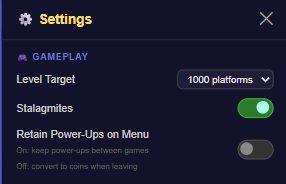
- Level Target — a dropdown for how many platforms a run goes before counting as complete: ∞ Endless, 100, 250, 500, 1000 (the default), 2000, or 5000. Reaching your target banks 100% of your coins and power-ups for the run.
- Stalagmites — a simple on/off toggle (default ON) for whether stalagmite hazards appear at all. There's no separate frequency slider — it's on or off.
- Retain Power-Ups on Menu — off by default. On keeps your power-ups when you leave a run back to the menu; off converts any unused power-ups to coins instead.
How to change it
- Tap the ⚙️ gear icon in the top nav bar to open Settings.
- Scroll to the 🎮 Gameplay section.
- Pick a Level Target, and flip Stalagmites or Retain Power-Ups on Menu as you prefer.
- Your next run starts with these settings applied.
Tips
- Set Level Target to ∞ Endless if you just want to climb as far as possible without a defined finish line.
- Turn on Retain Power-Ups on Menu if you like carrying a stockpile between sessions rather than cashing unused ones in for coins each time.
- Reaching your Level Target keeps everything from that run — worth remembering if you're deciding whether to push past it or bank your progress.