Floor Is Lava Display & Zoom Settings
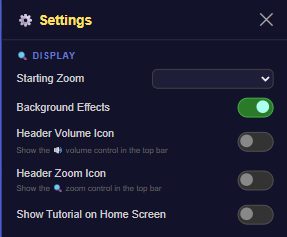
The 🔍 Display section controls how zoomed-in the game view starts, plus a couple of smaller visual toggles for the header bar.
What's in this section
- Starting Zoom — a dropdown with four options: 100% Desktop, 80%, 60% Mobile (the default), and 40% Zoomed Out. This sets how much of the tower you can see around your character when a run starts.
- Background Effects — toggle for the game's background visual effects, on by default.
- Header Volume Icon — shows a volume icon in the top header bar; off by default.
- Header Zoom Icon — shows a zoom icon in the top header bar; off by default.
There's no orientation lock or color-theme option in this section — Starting Zoom is the main thing worth tuning here, especially on a small phone screen where 40% Zoomed Out shows more of the tower at once.
How to change it
- Tap the ⚙️ gear icon in the top nav bar to open Settings.
- Scroll to the 🔍 Display section.
- Pick a Starting Zoom level from the dropdown, and flip the Background Effects or header icon toggles as you like.
- Changes apply immediately, including to your very next run.
Tips
- If you're playing on a small phone, try 40% Zoomed Out — it shows more platforms at once, which can make blind jumps easier to judge.
- 100% Desktop is worth trying if you're playing on a larger screen or in a browser window.