Floor Is Lava Audio Settings
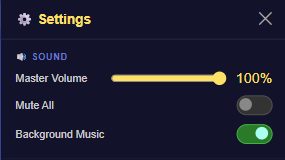
The 🔊 Sound section of Settings controls three things: overall volume, a full mute, and whether background music plays at all.
What's in this section
- Master Volume — a slider from 0-100%, defaulting to 45%. Controls overall game volume.
- Mute All — a single toggle that silences everything at once, without losing your Master Volume level for later.
- Background Music — a toggle for the music track specifically, separate from sound effects.
There's no separate sound-effects volume or toggle — Master Volume and Mute All cover both music and effects together, and Background Music only pulls the music layer out on its own.
How to change it
- Tap the ⚙️ gear icon in the top nav bar to open Settings.
- Scroll to the 🔊 Sound section.
- Drag Master Volume to your preferred level, or flip Mute All / Background Music.
- Changes apply immediately — there's no separate save or confirm step.
Tips
- Mute All is quicker than dragging the volume slider down to zero if you just need silence for a moment.
- Turning off Background Music but leaving Mute All off keeps sound effects like jump sounds and coin pickups audible.